How I Managed to Vibecode My Way out of Spaghetti
I wanted to quickly talk about how I managed to fix up local-harper.
What is local-harper? It's a small solid-js web-app I vibe-coded as a proof-of-concept editor/desktop app for Harper, the fast grammar checker written in rust. I really like Harper - it's fast, it's not LLM-based, and it's not annoying. However, I don't really like using the Obsidian plugin, for some reason, and the chrome extension didn't really work in the Standard Notes WebUI that I use to write quite a lot of stuff. So, I thought that a pretty nice workflow would be just copy-pasting whatever I'm writing into an ephemeral, harper-enabled editor thingy, fix up the grammar there, and paste back into Standard Notes.
Harper currently doesn't have a desktop app. It has a full-screen editor of sorts, but that's quite laggy on my laptop. More importantly, Harper has a JavaScript library, harper.js (JS wrapper which loads Harper through WASM).
I decided to whip up a quick grammar checker web-app which would use Harper. I had a general idea how the UI/UX should be, and I knew I wanted to use solidjs, since I've always been a sveltehead, but solid is very nice as well and I haven't used it enough to know it properly.
If you want to try it out, local-harper is deployed to https://kraxen72.github.io/local-harper/, and the code can be found here.
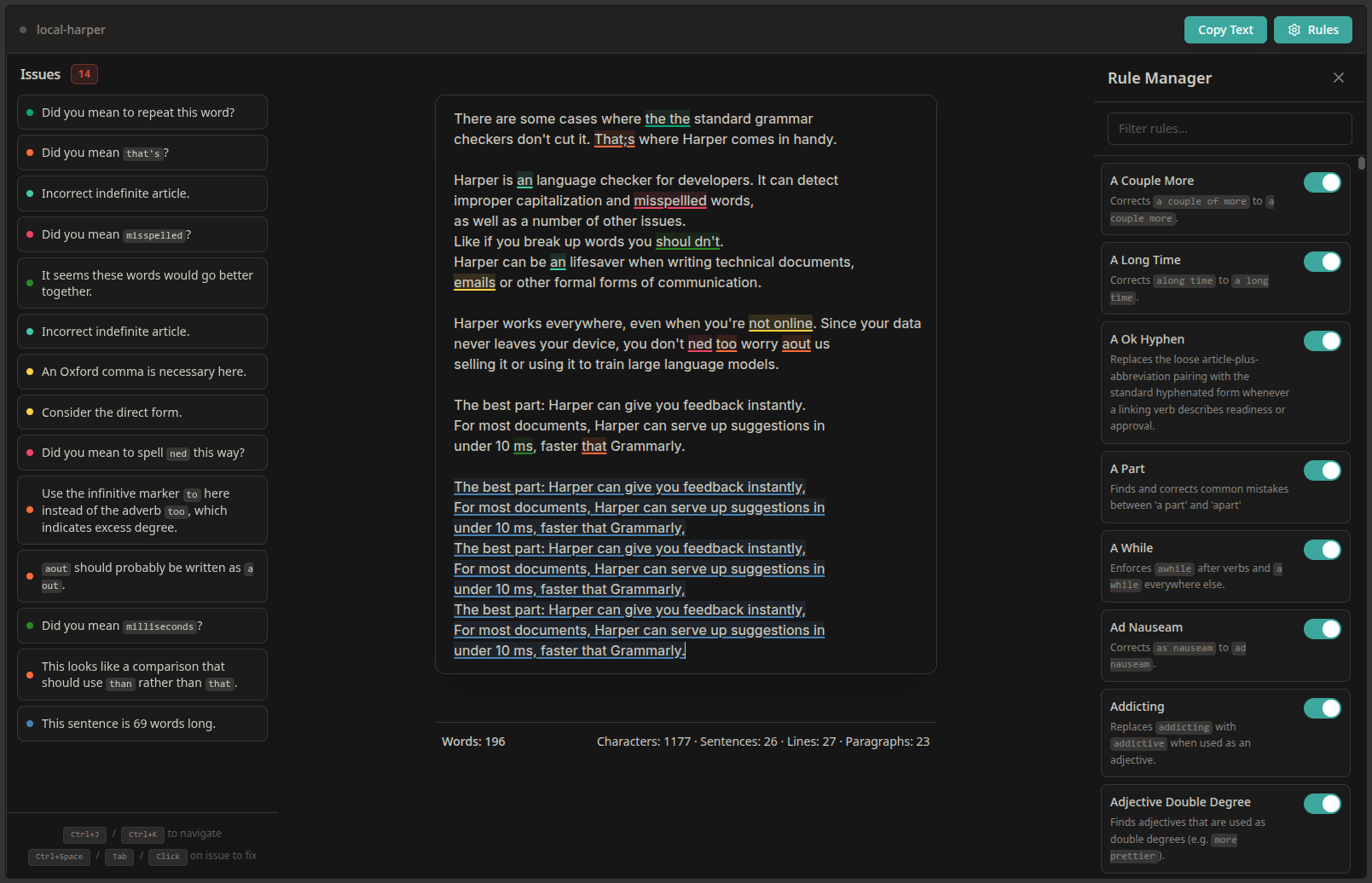
Initially, the app was fully vibecoded using gpt5-mini in GitHub Copilot when I had run out of my "good model" credits. I think this was one of my first actual forays into vibecoding; I remember split-screening VSCode and my browser, watching a youtube video, glancing over to the chat every once in a while, occasionally typing into it an testing the app as it was coming a long.
At some point, I had a usable app. It checked grammar with Harper, and you could toggle the rules, all that. I was honestly pretty surprised it worked, since it was gpt5-mini, of all models, making it.
The app worked, sure, but the things is - it was pretty messy. There was a bunch of dead code, duplication and just overall spaghetti code. Honestly, not really surprising for a vibe-coded app, but as I mentioned, this was one of my first times trying out vibecoding, as far as I remember. The code was so bad, to the point I / the agent couldn't really add any more features even if I / it tried.
Two separate times, I attempted to add two features in particular, and I had to scrap it both times. One of them was using virtualized lists for the rule manager (Harper has a lot of rules), and the second feature was throttling requests to harper.js instead of debouncing. Both times, I couldn't really get the agent to implement these features in a way where it would work or wouldn't break something else. After these two separate tries, I kinda gave up, pronouncing the app "too vibecoded to add any more features". I decided that I would eventually rewrite it from scratch myself.
A few months passed, I used the app on and off, but I kept thinking about it: is the current codebase really that unsalvageable? So I gave the ol' cleanup refactor a shot.
First, I tried fixing it using Claude Opus 4.6 through arena.ai. Smarter model = more fix, right? That didn't really work, because it just timed out/canceled the response in flight, because it was getting too long.
Then, I tried Claude Sonnet 4.6 Extended Thinking on claude.ai, using repomix to pack the whole codebase into one file. I had to retry it a few times, since the requests kept dying, but then I launched it from my phone, and it survived. Sonnet kept churning at it for over an hour while I was doing some university assignments, but Sonnet's final implementation didn't work at all. It crashed even before rendering the site. I tried to fix it - I fixed one or two issues I thought might be it by hand, but it still wouldn't work, so I quickly abandoned that attempt.
Lastly, I tried using Qwen3-Coder through OpenCode. Qwen gives each account 1000 free daily requests, and 60req/min, so I just created like two additional accounts and re-authed midway when it started timing out. Qwen really went to town on it, and managed to eventually fix it.
I think most of the success comes from the OpenCode harness: The OpenCode harness is very good, because it gives the agents LSP servers and tools to run commands in the workspace, so it could quickly iterate and fix up most if not all issues it had introduced in the refactor. I'm sure there are better harnesses, but anyway it's probably much better than what I tried doing before. I know Claude Web nowadays has a Linux container it can play around with, but as I mentioned above, I tried that, and it didn't work.
After Qwen's refactor was done, I did like one or two more rounds of bug fixing on the refactor, and I managed to get the codebase down in size by about 60%. In the process, I also managed to preserve all features and read/learn the codebase a bit.
Regarding the prompt I gave Qwen, I basically told it to aggressively clean up and remove the code, making it elegant, and the quote "If I had more time, I would have written a shorter letter" and all that. I also told it to fully rip out the rule manager implementation since I knew that part was cooked beyond repair. Once that was ripped out and all cleaned up, I told it to implemented in a clean, modular way from scratch.
I think I did a few manual changes, but basically, Qwen managed to whip the codebase into shape, to the point where it's much smaller, it's much less spaghetti, and I actually kind of know what's going on in there.
This simplification and me reading the code meant I could land two more feature pull requests over the next couple of weeks which were like maybe 70% AI and 30% some of my manual touch-ups, especially UI.
Overall, the app is in a pretty good state right now. The UI's polished, the app is convenient (keyboard shortcuts, etc.) and feels nice to use, while the codebase & code quality / component/module division is also alright.
opencode prompt
I had initially asked Claude Opus 4.6 through arena.ai, to give a comprehensive audit of all the impelmented features, give top candidates for removal, and advise whether we should salvage the existing codebase to start from scratch. I pasted this whole thing below as the initial prompt for opencode, prepended with let's continue this conversation.
opus transcript
this application works, but it's kinda cooked - the code is extermly spaghetti, the data models are bad, and any new features can hardly be added. i'd like you to first, comprehensively assess the entire codebase and list out the features/deicsions it makes. i'll then review these and hopefully remove some of then, and then you can povide a minimal from-scratch implementation which meets all those goals.
Core Features
- Local grammar checking — Harper.js runs entirely in browser via WASM Web Worker. Text never leaves the device.
- CodeMirror 6 editor — Used as the text editing surface with line wrapping, history, placeholder text.
- Debounced live analysis — 200ms debounce after typing stops; generation counter invalidates stale results.
- Colored issue underlines — Each lint kind (Spelling, Grammar, Punctuation, etc.) gets a distinct underline color via CSS custom properties (RGB triplets).
- Cursor-position tooltips — When cursor is on an issue, a tooltip appears showing the lint kind badge, message, and optionally an "Ignore" button.
- Autocomplete-based suggestions — Harper's fix suggestions are surfaced via CodeMirror's
@codemirror/autocomplete. Shown on click, Tab, Ctrl+Space, or sidebar click. - Apply suggestions — Uses
linter.applySuggestion()then finds the minimal diff to patch the editor. - Copy text button — Copies editor content to clipboard.
Issue Sidebar
- Issue list sidebar (left panel) — All current issues listed, sorted by document position.
- Bidirectional selection sync — Clicking an issue in sidebar scrolls editor to it + triggers autocomplete. Moving cursor in editor highlights corresponding sidebar item.
- Sidebar auto-scroll — Selected issue in sidebar scrolls into view via
scrollIntoView. - Issue count badge — Red badge in sidebar header showing total issue count.
- Empty state — Checkmark + "No issues found" message when no issues.
- Keyboard shortcut hints — Footer showing Ctrl+J/K, Ctrl+Space, Tab, Click hints.
Issue Interaction
- Keyboard navigation — Ctrl+J (next issue), Ctrl+K (previous issue), with wrapping.
- Tab triggers autocomplete — When cursor is on an issue, Tab opens suggestions instead of inserting a tab.
- Click triggers autocomplete — Clicking on an underlined issue opens autocomplete (with deduplication to avoid re-triggering on same issue).
- Ignore issue — Temporarily hides an issue for the current session (stored in a
Setin memory, lost on refresh). - Smart autocomplete suppression — If an issue has no suggestions and isn't a spelling issue, autocomplete isn't triggered (only "Ignore" would show, so tooltip's Ignore button is shown instead).
- "Add to Dictionary" option in autocomplete for spelling issues.
Rule Management
- Rule manager panel (right panel) — Toggle-able via "Rules" button in top bar.
- Individual rule toggles — Each Harper lint rule can be enabled/disabled with a toggle switch.
- Fuzzy rule search — uFuzzy-based search over rule display names and descriptions, with typo tolerance.
- Rule descriptions — Fetched from Harper and displayed under each rule name.
- Export rules — Downloads current rule config as timestamped JSON file.
- Import rules — Upload a JSON file, validated with Valibot schema, applied to Harper.
- Default disabled rules —
AvoidCursesdisabled by default. - Persistent rule config — Saved to/loaded from localStorage.
Dictionary
- Custom word dictionary — Words can be added via autocomplete "Add to Dictionary" option.
- Persistent dictionary — Custom words saved to localStorage, loaded on init.
Word Counter
- Word counter bar — Sticky at bottom, shows words, characters, sentences, lines, paragraphs via
@twocaretcat/tally-ts. - Selection-aware counting — When text is selected, counter shows stats for selection only; otherwise shows full document stats.
Dialect
- Dialect setting — Can be set (American/British), persisted to localStorage. (Note: there's no UI to change it — it's only settable via the service layer.)
UI/UX Decisions
- Flexoki dark color scheme — Custom CSS properties for the entire dark theme.
- Responsive 3-column grid layout — Issues | Editor | Rule Manager, with breakpoints at 1400px and 900px.
- Rule manager replaces sidebar on small screens — On screens <1400px, opening rule manager hides the issue sidebar.
- Inter Variable font — Used for both UI and editor text.
- Custom scrollbar styling — Dark themed scrollbars.
- Cyan text selection color — Custom
::selectionbackground. - Loading progress bar — Indeterminate linear progress bar during Harper initialization (CSS-only animation from "matter" library).
- Analysis indicator — Pulsing green dot in top bar while analysis is running.
- Formatted messages — Backtick-delimited text in issue messages rendered as inline
<code>elements. - PascalCase → human-readable — Rule names like
AvoidCursesdisplayed as "Avoid Curses". - Lint kind → kebab-case CSS variable mapping for colors.
IssueSeverityenum — Maps lint kinds to Error/Warning/Info. (Note: computed but never used in any visible UI — no severity icons, colors, or filtering based on it.)
Technical/Architectural Decisions
HarperIssuewrapper type — Wraps Harper'sLintwithid,severity, andrulefields.- Issue IDs — Generated as
issue-${Date.now()}-${index}on every analysis pass. - Module-level mutable state —
issueActions,lastClickedIssueInEditor,lastNotifiedIssueIdin editor-extensions.ts;lastClickedIssueFromSidebar,ignoredIssues,debounceTimeout,analysisGenerationin App.tsx. IssueTooltipWrapper— Thin wrapper component that just passes props toIssueTooltip.- Re-analysis pattern — Duplicated in multiple handlers:
analyzeText → transformLints → filter ignored → setIssues. - COOP/COEP headers — Set in Vite dev server config for SharedArrayBuffer (WASM threading).
- GitHub Pages deployment — GitHub Actions workflow, base path
/local-harper/. - Console.log debugging — Left in
harperAutocompletefunction. initializeDefaultRuleConfig()— Function exists in service but is never called.- Many re-exported but unused Harper types —
Span,Linter,LinterInit,LintOptionsre-exported but never imported elsewhere. valibotused only for import validation — Single use inimportRuleConfig.
Summary of likely candidates for removal/simplification:
- #45
IssueSeverity— computed but never displayed - #33 Dialect UI — no UI exists for it, just dead code
- #49
IssueTooltipWrapper— unnecessary indirection - #54
initializeDefaultRuleConfig()— dead code - #55 Unused type re-exports
- #53 Console.log statements
- #18 Ignore feature — broken by design (issue IDs regenerate on every analysis, so ignored IDs never match after text changes)
- #46
HarperIssuewrapper — could be simplified significantly - #48 Module-level mutable globals — source of spaghetti; could be restructured
- #50 Duplicated re-analysis pattern — should be a single function
Let me know which features you want to keep, which to remove, and any other changes, and I'll provide a clean from-scratch implementation.
i want to keep the first three sections: all core features issue sidebar issue interaction (keyboard navigateion, tab to trigger autocomplete, ignore issues, smart autocomplete supression) remove the rule manager fully, just use default rules, american dialect. custom dictionary should stay but be as simple as possible. word counter should stay, as well as selection-aware counting. flexoki i want to keep harper.js loading through wasm in the browser, the solid.js ui framework, tailwindcss 4 styling, github pages deployment. you may make any technical / architectural decisions which lead to a clean, maintainable and mostly minimal implementation.
instead of starting from scratch, clean up the project, whipping it into shape as much as possible. after the chagnes, repeatedly run pnpm dev, curl the localhost url, and if pnpm dev shows some errors (or the localhost url), fix them, and repeat until it works.
opencode transcript
The full OpenCode transcript can be found here, but in case opencode transcript link shares die, here's an outline:
after my initial prompt (see above), I have the agent continue that conversation, so the session "starts mid-conversation" — the agent already had context on the codebase and was in the middle of a larger cleanup task)
- Removed
RuleManager.tsx,RuleCard.tsx,Toggle.tsx, andIssueTooltipWrapper.tsxcomponents - Stripped dead code from
harper-service.ts:initializeDefaultRuleConfig(),getLintConfig(),setLintConfig(),exportRuleConfig(),importRuleConfig(),updateSingleRule(),getLintDescriptions() - Removed unused type exports (
Span,Linter,LinterInit, etc.) and the never-usedIssueSeverityenum - Dropped the
valibot,@leeoniya/ufuzzy, and@codemirror/tooltipdependencies - Simplified
App.tsx(~90 lines removed),TopBar.tsx(rules toggle button gone), andharper-service.ts(287 → 87 lines) - Simplified the CSS layout from a 3-column grid to a 2-column grid
- Verified the cleanup compiled cleanly with
pnpm lint(zero TypeScript errors), then confirmed the dev server served the app correctly
the layout is a bit broken: the sidebar takes up exactly half of the screen, while it should be more like: sidebar: 15-30%. middle: 80-85ch, centered to true center! (either absolutely, but ideally, by making a "ghost sidebar" on the right of the same size, but min-width 0 in case i resize the window. s.t. it centers to the true middle). ignoring is still broken (it previously was) — when i hit ignore on something, and then i do some changes, it forgets all ignores because they shifted, probably. make a more robust ignoring system that's not overcomplicated. otherwise it seems to work nicely.
- Updated the CSS grid to
minmax(200px, 25%) minmax(80ch, 85ch) minmax(200px, 25%)with a namedghostarea on the right, ensuring the editor column is centered to the true middle of the screen - Added responsive breakpoints (1200px and 900px) that collapse the ghost column to
0on smaller screens - Rewrote the ignore system: instead of tracking ignored issues by their reactive ID (which shifted as the text changed), the agent introduced a
getIssueSignature()function combininglint_kind | message | problem_text | span.start-span.endinto a stable string key - Updated all three places that filtered ignored issues (
scheduleAnalysis,handleAddToDictionary,handleIgnore) to use signatures from the newSet
now, that you have a good understanding of the architecture, re-implement the rule manager in a minimal, simple & modular way such that the code will be structurally sound and maintainable for the future. no need for over-complication, a virtual scroller, or fuzzy searching. just a simple list with toggles, as simple as possible (with filtering (trim+lowercase), and matching the visual style of the app). aim for fast, smooth performance. and center the ui properly. (rule manager can be on the right). text input should be +5ch wider.
- Rebuilt
RuleManager.tsxfrom scratch as a self-contained component: a search input (trim + lowercase filter), a flat list of rule rows each with a toggle, no virtual scroll, no fuzzy search - Wired it back into
App.tsxwith minimal state (isRuleManagerOpen,currentLintConfig) and a cleanonRuleTogglecallback - Restored the Rules toggle button to
TopBar.tsx - Re-added
getLintConfig(),updateSingleRule()toharper-service.ts(only what the new component actually needed) - Matched the Flexoki dark theme visual style throughout
the layout is still kinda broken. use css grid with minmax(0, 1fr) 3fr minmax(0, 1fr), and inside of the 3fr should be the editor component with width: 100% max width 90ch (or something like that). add a media query for when the ignore system is a tiny bit broken: if i ignore something, and then make the same mistake earlier (same text), it will rather ignore that one than the one i ignored originally. any way we can make ignores more stable? first suggest solutions
- Agent proposed three approaches:
- Surrounding context — extend the signature to include a few characters of text before and after the span, making it positionally aware without being brittle to large edits
- Text snapshot — store the full document state at ignore time and match against a re-diffed version
- Absolute character offset with drift tolerance — anchor to the byte offset and allow a small drift window
let's do solution 1.
- Updated
getIssueSignature()to capture a window of surrounding text (e.g. 20 characters before and after the span) alongside the existinglint_kind | message | problem_textfields, making ignores resilient to the same mistake appearing elsewhere in the document while still surviving minor local edits
also fix this. you do not need to fix it exactly like it suggests: Saved lint config is never restored on initialization.
toggleRulepersists the config tolocalStorageunderharper-lint-config, butinitHarperonly loads the default config and never reads the saved config. User rule preferences will be lost on page reload.
- Modified
initHarper()to readharper-lint-configfromlocalStorageafter fetching the default config - On first visit (no saved config): applies
DEFAULT_DISABLED_RULESas before - On returning visits: merges the saved config over the defaults, preserving user rule preferences across reloads
- Added a
try/catcharound the JSON parse so a corrupted entry silently falls back to defaults - Confirmed the fix compiled cleanly (
pnpm lintpassed) and the dev server served correctly